6 min read
How to use Trendmule's Website Tracking Tool to find rising searches
Add your website, see which searches are rising in your niche, and find the ones you don't rank for yet.

Contents
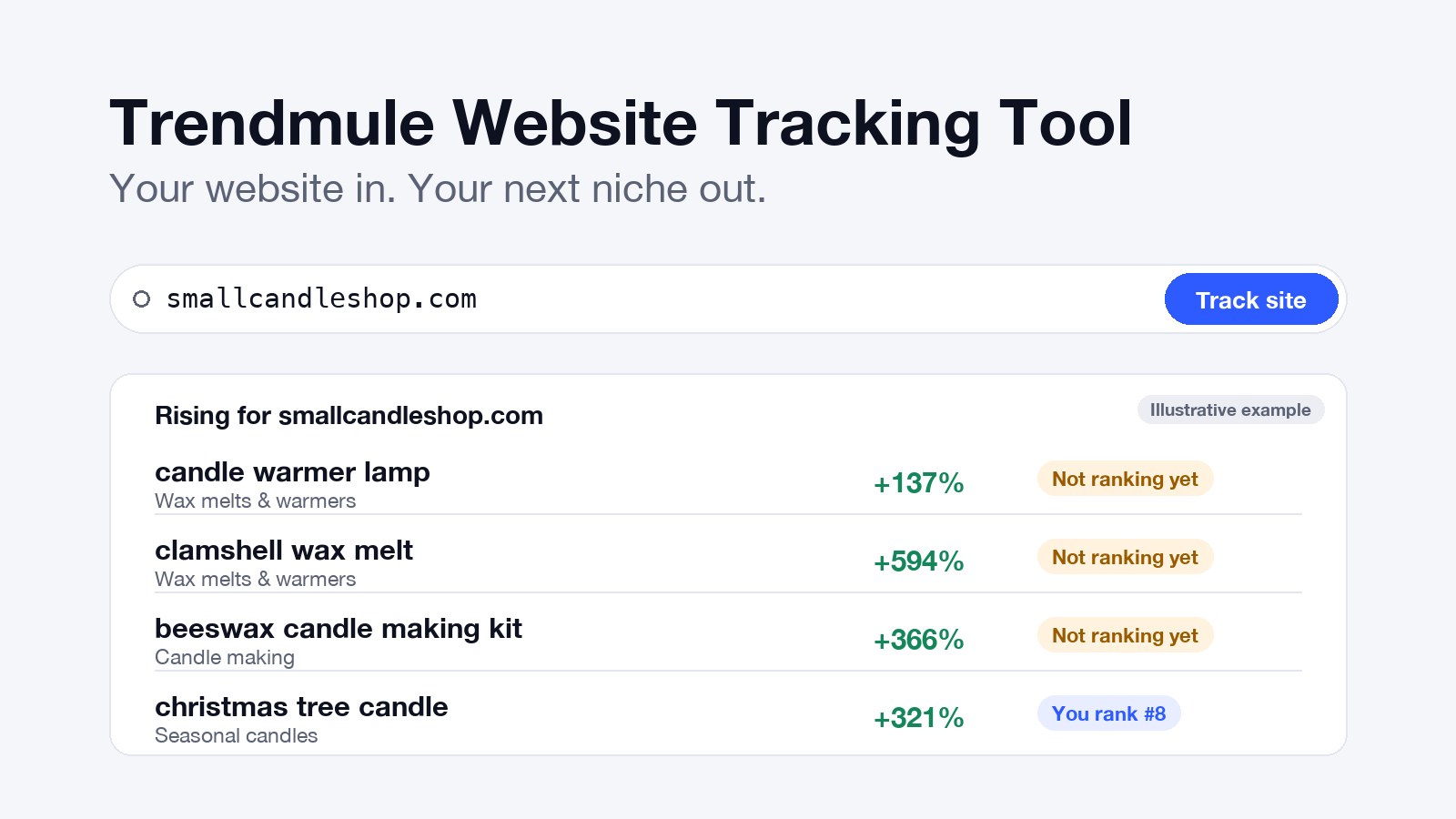
To use Trendmule's Website Tracking Tool, add your website's address and press Track site. The tool reads your pages, names your niche and lists the Google searches rising in it, each marked by whether your site ranks for it yet. The ones marked "Not ranking yet" are the pages to make next.
What is Trendmule's Website Tracking Tool?
Trendmule's Website Tracking Tool is the part of Trendmule, a dashboard of rising Google searches for creators and app makers, that starts from your website instead of a keyword. It shows the searches growing in your niche, and whether your site is there to meet them.
How do you use the Website Tracking Tool?
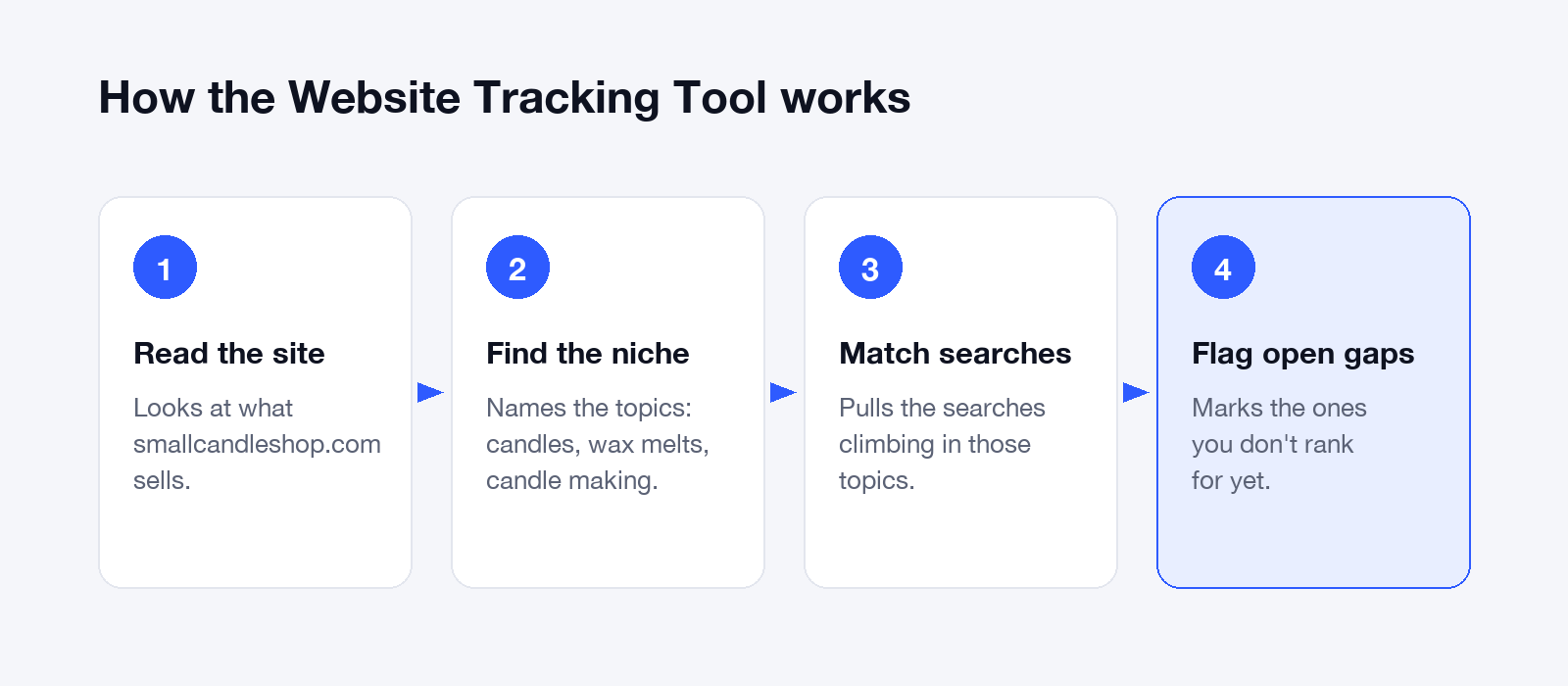
Using the Website Tracking Tool takes four steps:
- Add your website. Paste the address and press Track site. The tool reads what your pages are about.
- Check your niche. It names the topics your site belongs to. Clear product and category pages give it more to read.
- Read the list. Each rising search shows how fast it's growing, its topic, and "Not ranking yet" or your position, like "You rank #8".
- Act on it. Make pages for the rising searches marked "Not ranking yet", improve the ones you already rank for, and spend less on searches that are falling.
The list then keeps itself current. Open-gap reports are coming soon.
Why is it efficient for a small business?
The Website Tracking Tool is efficient because it skips the slowest parts of keyword research: choosing which searches to check, and checking each one against your rankings. For the full process, see keyword research for small business.
- No seed list. Your pages already describe your niche.
- Only searches that fit you. A candle shop sees candle searches, not everything that's trending.
- The gap is already marked. No cross-checking in a second tool.
- It keeps watching. A hand-built list goes stale by next season.
Example: what the tool finds for a candle shop
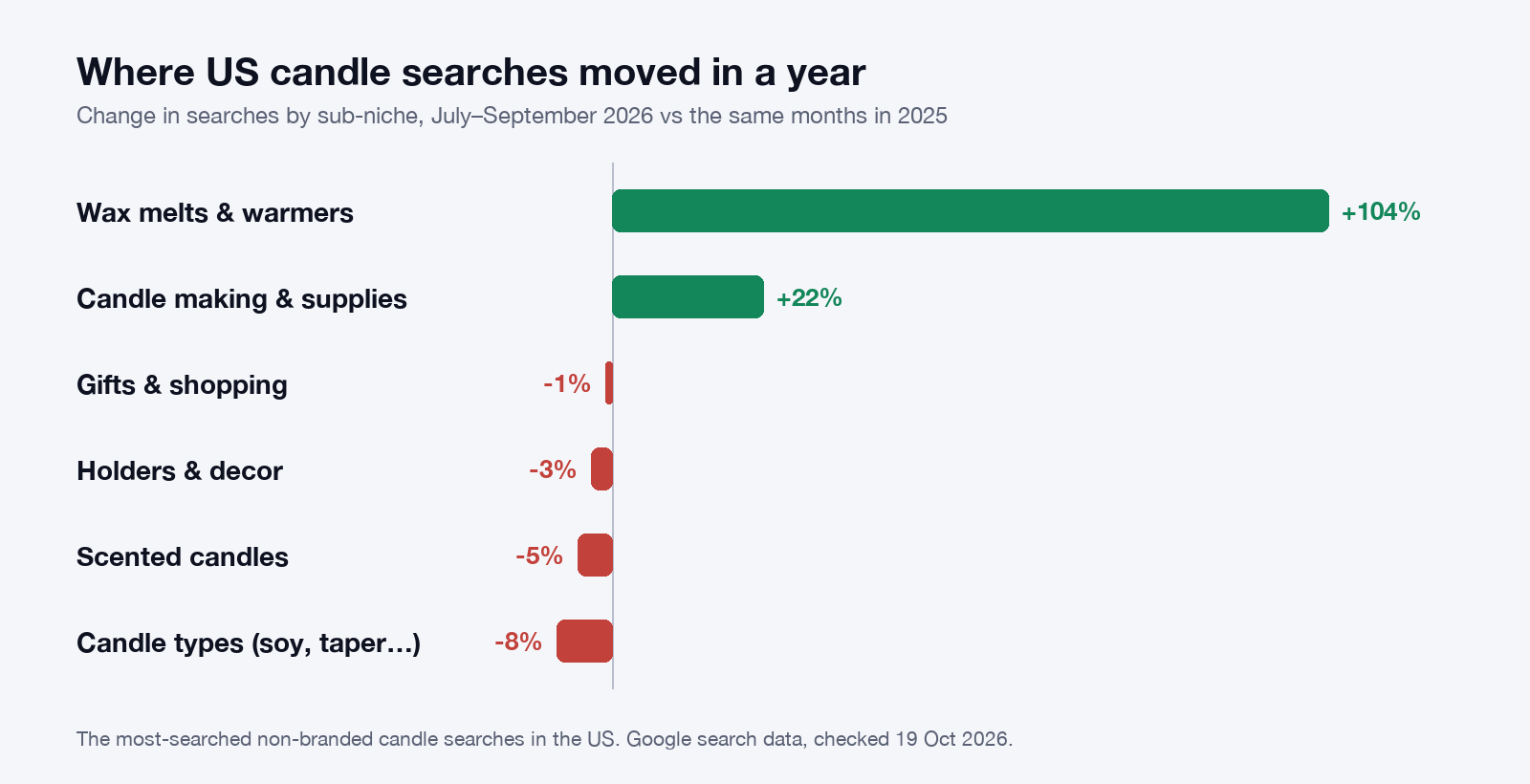
For a small candle shop, the Website Tracking Tool points where most owners don't look. In our research on US candle searches, wax melts and warmers more than doubled (+104%) between July–September 2025 and the same months in 2026, and candle making grew 22%. Scented candles fell 5%.
Here's the kind of list the tool shows for smallcandleshop.com, a sample shop selling soy jar candles:
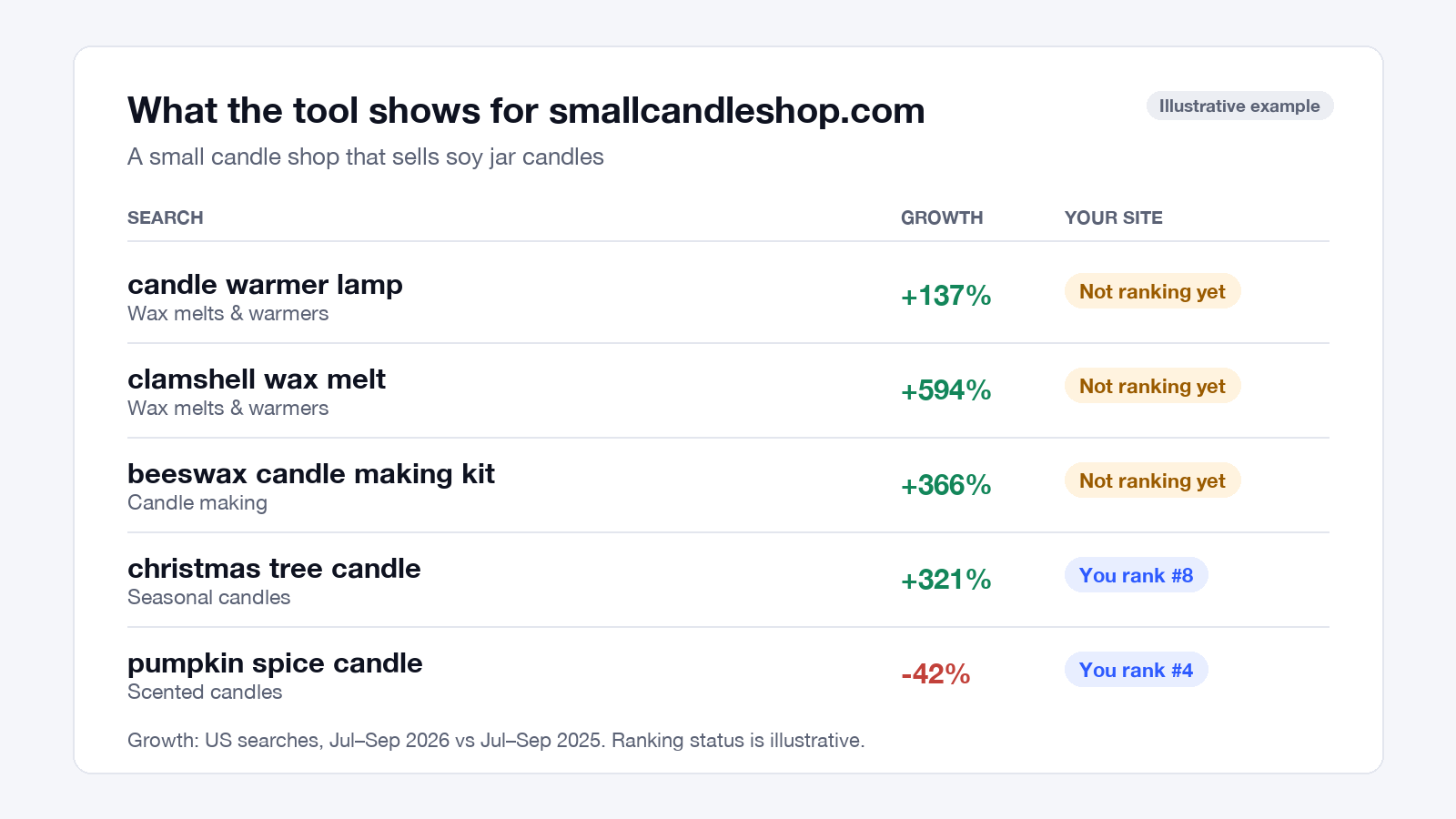
Read it like a to-do list:
- Add wax melts and warmers. "Candle warmer lamp" is up 137% and "clamshell wax melt" up 594%, both "Not ranking yet".
- Sell a beeswax kit. "Beeswax candle making kit" is up 366%, while soy kits fell 65%.
- Improve what already ranks. The shop is 8th for "christmas tree candle", up 321%.
- Ease off what's fading. "Pumpkin spice candle" fell 42%, so this season's ad money goes elsewhere.
"More scents means more sales" is the belief this data pushes back on. The growth is in how people melt and make candles.
Can a small business rank for these searches?
Yes, often. In our research, more than half of US candle searches had a small site in Google's top 10 (a site with few links from other websites), as of 19 October 2026. For wax melts and warmers it was about two-thirds. What small sites lack is knowing which searches to go after first.
How does it compare with other tools?
The Website Tracking Tool is the only tool here that starts from your website and shows what's rising in your niche.
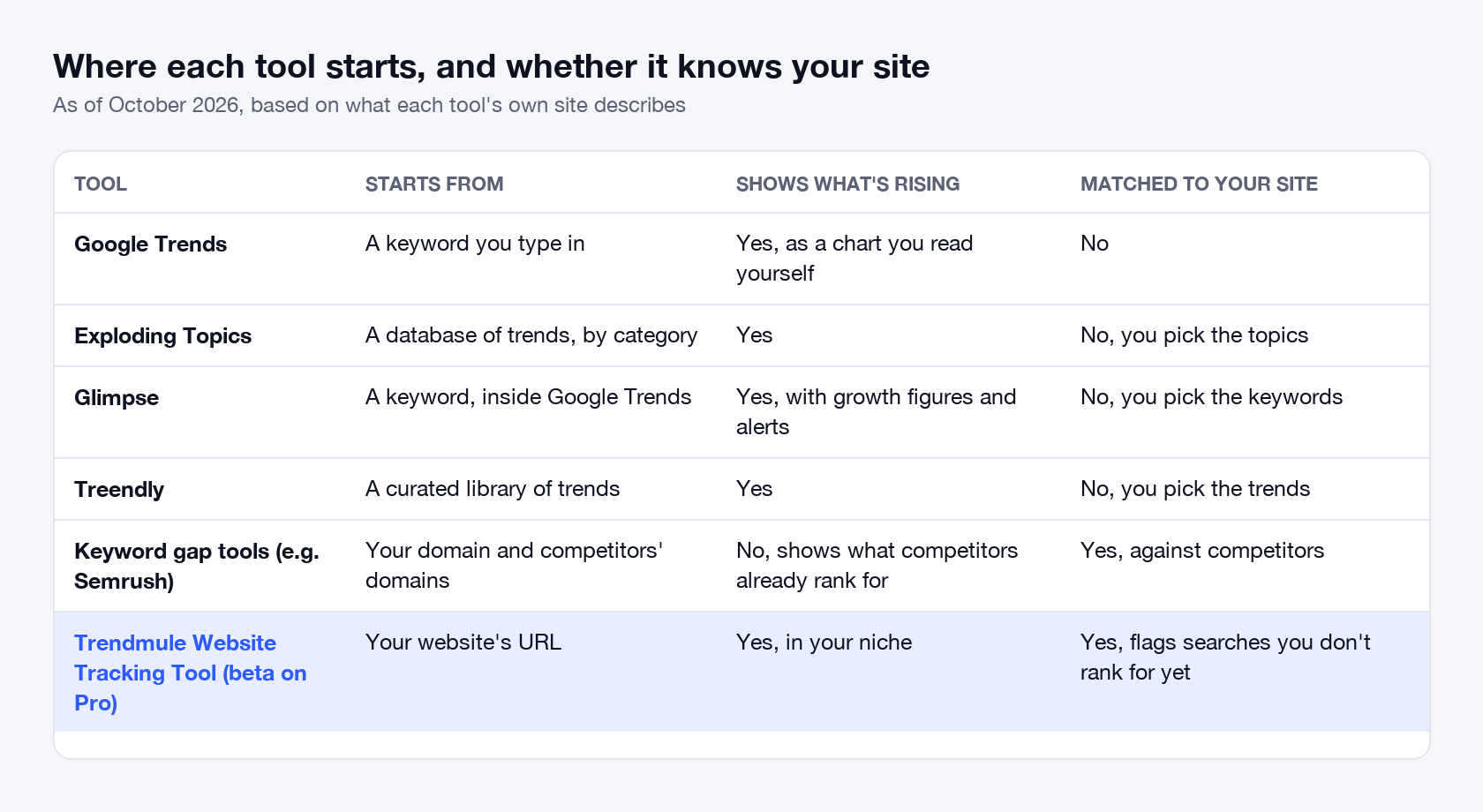
- Google Trends, Glimpse, Exploding Topics and Treendly start from a keyword or a trend list, so you match results to your site yourself. More in Google Trends alternatives.
- Keyword gap tools, such as Semrush's Keyword Gap, start from your site but show what competitors already rank for: demand someone has already won.
- Trendmule's Website Tracking Tool starts from your website and flags the rising searches you don't rank for yet.
A gap tool shows where you're behind. The Website Tracking Tool shows where you could be first.
What the Website Tracking Tool won't do
The tool finds the searches; it doesn't write the page that has to beat what ranks today. And a rising search can be seasonal, which is why Pro keeps 2 years of trend history. If you're looking for what to build next, rather than what fits your site, App ideas lists rising searches that look like apps.
How we did the research
We grouped the most-searched US candle searches into sub-niches and compared their Google search volume in July–September 2026 with the same months in 2025, so seasonal swings cancel out. A small site is one with few links from other websites. Figures checked on 19 October 2026.
Questions people ask
How do I find trending keywords for my website?
Start from your website, not a keyword list. Trendmule's Website Tracking Tool reads your pages, finds your niche and lists the searches rising in it, marked by whether you rank for them yet.
Can a small business rank on Google's first page?
Often, yes. More than half of US candle searches had a small site, one with few links from other websites, in Google's top 10, as of October 2026.
Is Trendmule's Website Tracking Tool available now?
It's in beta on the Pro plan, as of October 2026. Trendmule is in early access: you join with your website and get into the dashboard when your spot opens.
Which Trendmule plans include the Website Tracking Tool?
The Website Tracking Tool is included in Trendmule's Pro plan, in beta, for up to 5 websites. Prices as listed on trendmule.com on 19 October 2026, in USD, plus VAT or sales tax where it applies:
- Creator: $24 a month or $290 a year. The trends dashboard, no website tracking.
- Pro: $74 a month or $890 a year. The Website Tracking Tool for up to 5 websites, 2 years of trend history, unlimited niche alerts and 3 team seats.
- Business: not yet priced, coming soon. Up to 25 websites and 10 team seats.