5 min read
Google Trends alternatives in 2026: 6 tools compared
What each tool shows that a trend chart doesn't, what it costs, and which question it answers best.

Contents
Google Trends alternatives are tools that answer what a free trend chart leaves open: how many people search, where to start, and whether a search is still rising. Six are compared most often: Trendmule, Glimpse, Exploding Topics, Treendly, Pinterest Trends and Google Keyword Planner. Each fills a different gap, so the right one depends on the question you need answered, not on which has the most data.
Which Google Trends alternatives are there?
Here are the six side by side, as of 21 October 2026:
- Trendmule: rising Google searches by country and topic, each labelled by whether it's still climbing. From $24 a month.
- Glimpse: a Chrome extension and web app that add search volume to trend charts. Free plan; paid prices not listed publicly.
- Exploding Topics: a database of 1.1M+ trends, products and startups. From $39 a month; CSV export from $99.
- Treendly: a trend tracker with a free plan, and Pro at €99 a year with API and MCP access for up to 25 monitored trends.
- Pinterest Trends: search, save and shopping trends on Pinterest. Free with a Pinterest business account.
- Google Keyword Planner: monthly search estimates inside Google Ads. Free with an Ads account and billing details.
Why look for an alternative to Google Trends?
Google Trends answers one question: how interest in a search you already have has changed. Everything after that is up to you, which is why people go looking for another tool.
- Where do I start? You need a search before you can look anything up.
- Is it still rising? A line that went up last month can be flat today.
- Is it big enough? Interest on a 0 to 100 scale doesn't say how many people searched. Our guide does Google Trends show search volume explains why.
- Is it new or seasonal? You compare years yourself to find out.
Google Trends is still free and good at what it does. Our guide on how to use Google Trends covers it step by step.
What does each alternative do?
Trendmule
Trendmule is a dashboard of rising Google searches for content creators and app makers. You pick a country and a topic, and it lists the searches gaining speed there, ranked by momentum. Every search carries a label: Trending, Sticking around, Always popular or Fading.
It also finds the rising searches that fit a website you add, with the Website Tracking Tool (beta, Pro), and answers trend questions inside Claude, Cursor or VS Code through its MCP server. Suits: people who decide what to make or stock every week.
Glimpse
Glimpse adds estimated search volume on top of trend charts, as a Chrome extension and a web app, so the 0 to 100 line gets a real number beside it. Suits: people who already use Google Trends and want the missing counts.
Exploding Topics
Exploding Topics is a database of more than 1.1 million trends, products and startups. Suits: people looking for emerging product and startup ideas, with CSV export on the higher plan.
Treendly
Treendly tracks trends with a free plan and a yearly Pro plan that adds API and MCP access for up to 25 monitored trends. Suits: people watching a short, fixed list of trends.
Pinterest Trends
Pinterest Trends shows what people search, save and shop for on Pinterest. Suits: visual and seasonal niches, if you have a Pinterest business account.
Google Keyword Planner
Keyword Planner gives monthly search estimates inside Google Ads, free once you have an account with billing details. Suits: sizing keywords you already have, especially before running ads.
Are the trends on trend lists still rising when you read them?
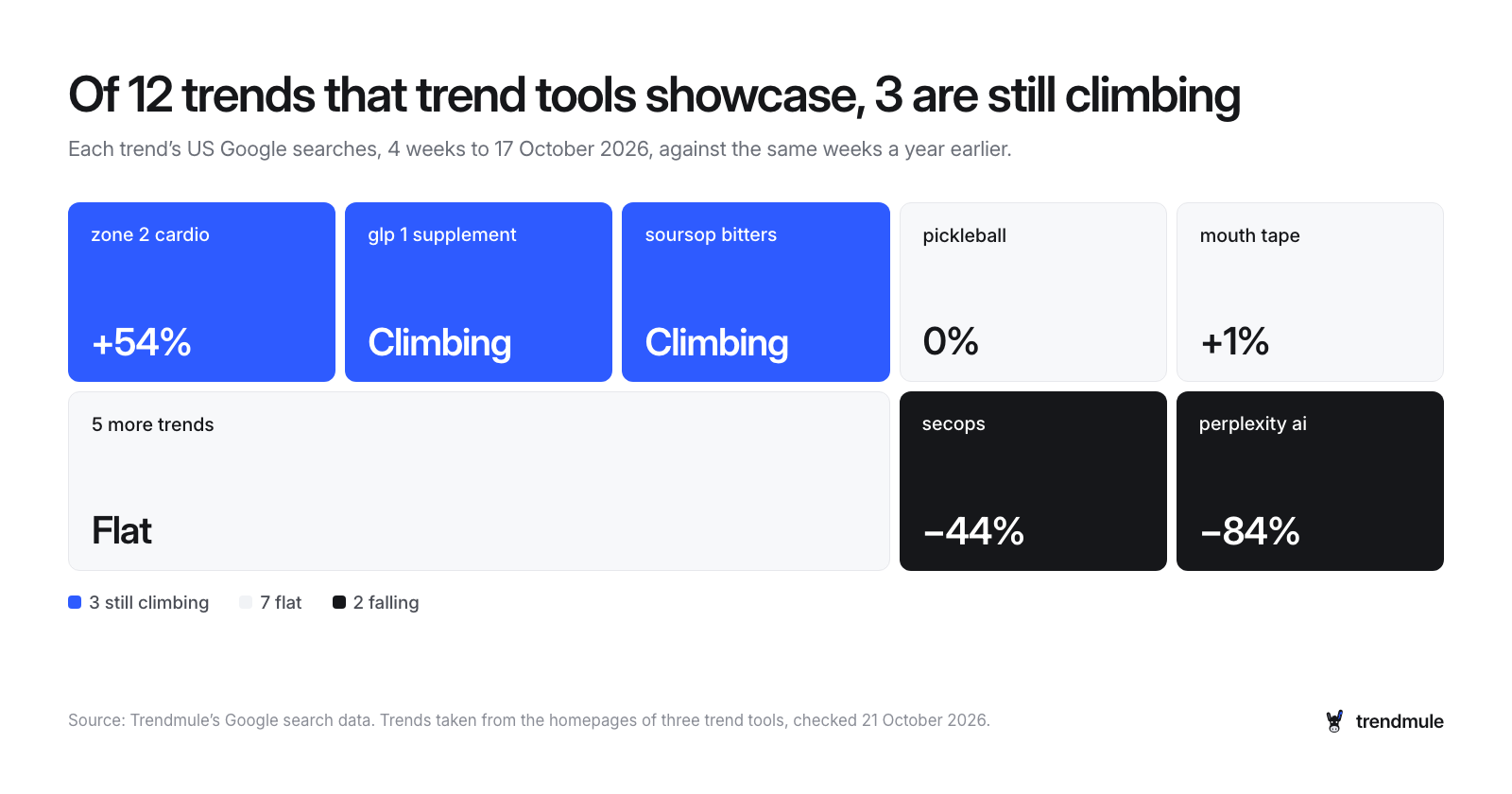
Often they aren't, which is why timing matters as much as discovery. We took the 12 trends that three trend tools feature on their own homepages and checked each in Trendmule's Google search data: US searches in the four weeks to 17 October 2026 against the same weeks a year earlier.
- 3 of 12 were still climbing, including "zone 2 cardio", up 54%.
- 7 of 12 were flat, including "pickleball" (0%) and "mouth tape" (+1%).
- 2 of 12 were falling: "secops" (−44%) and "perplexity ai" (−84%).
Many of those calls were right when they were made. A trend list ages, so a search spotted early can be flat by the time you read it, and a label that updates is the answer to that. Our post on when to jump on a trend, and when to get off shows how fast it happens.
Which alternative should you pick?
Pick by the question you ask most often:
- "What's still rising in my country and niche this week?" Trendmule.
- "How many people search for this?" Keyword Planner if you run ads; Glimpse if you live in Google Trends.
- "What new products or startups are emerging?" Exploding Topics.
- "What's rising on Pinterest?" Pinterest Trends.
Whether a paid tool is worth it depends on how often you decide what to make: weekly, yes; twice a year, a free chart will do. For the free options, see how to find trending keywords.
What are the trade-offs?
- Trendmule is in early access. Its trend library is younger than older tools', and API access is still coming soon.
- Creator is light on history. It keeps 1 month; most weekly users will want Pro's 2 years.
- A label is a starting point. It says a search is rising; you still decide whether your shop, channel or app can serve it.
Compare Trendmule's plans.
Questions people ask
Is Google Trends free?
Yes. Google Trends is free and needs no account. It shows relative interest from 0 to 100, not the number of searches, so many people pair it with a tool that does.
What is a good alternative to Google Trends?
Trendmule, if you need what's still rising in your country and niche, from $24 a month. For search counts, Keyword Planner or Glimpse; for emerging products, Exploding Topics.
Which trend tool shows if a search is still rising?
Trendmule. Every search carries a label, Trending, Sticking around, Always popular or Fading, so you see where it stands today in every country and region.
Which trend tools work with Claude or Cursor?
Trendmule has an MCP server on every plan, so Claude, Cursor and VS Code can ask about today's rising searches. Treendly's Pro plan also lists MCP access.
Updated 16 November 2026